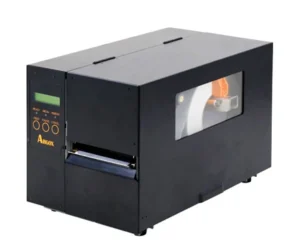
In manufacturing, logistics, and healthcare fulfillment, labeling bottlenecks disrupt entire supply chains. The Zebra ZT411 Industrial Barcode Label Printer is designed to eliminate these friction points. Built upon the proven reliability of the ZT400 series, the ZT411 introduces a modern touch interface, versatile print resolutions, and advanced connectivity to keep mission-critical operations running smoothly.


R18,555.25 incl vat
.
Available To Order
Free Delivery: Available for all Gauteng orders.
Nationwide Delivery: For all other provinces R120 excl vat.
Local Pickup: Free collection available from our premises.
Processing Time: Orders are ready for collection or dispatch within 2 to 4 working days after payment reflects in our account.
Zebra ZT411 Advanced Industrial Label Printing Built for High-Volume Operations
Featuring an all-metal frame, enterprise-grade processing power, and modular field-upgradable options, the ZT411 stands out as an industry-standard workhorse for medium to high-volume labeling environments.
Print Method: Thermal Transfer
Max Print Width: 104mm
Print Speed: 14ips
Interface Ports: USB + USBHOST + Serial + Ethernet + Bluetooth 4.1/MFI
Warranty: 1 Years
Product Brand: Zebra
MPN: ZT41142-T0E0000Z
Included Software: ZebraDesigner Essentials – easy label design tool
Ribbon Length: 450 meters
Core Operational Advantages
1. Zebra ZT411 Intuitive Color Touchscreen
The most noticeable upgrade over predecessor models is the 4.3-inch full-color touch display. Operators can navigate intuitive menus, adjust settings, and view color-coded status alerts at a glance. Visual step-by-step guides display directly on screen to help workers clear media jams and load ribbons quickly.
2. Zebra ZT411 Exceptional Print Speed & Versatile Resolution
The ZT411 handles demanding print runs with top speeds reaching 14 inches per second (356 mm/s) at 203 dpi. For applications requiring ultra-dense barcodes or tiny component tags, the printer offers field-convertible printhead options in 203 dpi, 300 dpi, and 600 dpi.
3. Zebra Print DNA & Link-OS Security
Modern industrial equipment requires robust cybersecurity and remote management. Zebra’s Print DNA software suite allows network administrators to manage, monitor, and configure fleet printers remotely. PrintSecure technology protects devices against unauthorized network intrusions.
4. Modular Field Upgrades & RFID Capability
To protect your investment as operations grow, the ZT411 features factory or field-installable media handling options (peelers, cutters, rewinder) and RFID encoding capabilities. The optional ZT411 RFID On-Metal version allows printing and encoding of thicker RFID tags designed for metal assets and containers.
5. Zebra ZT411Bi-Fold Door for Tight Spaces
Designed for space-constrained industrial floors, the printer utilizes a bi-fold media door. This structural design reduces the required opening clearance by 50%, making ribbon and roll swaps simple even in tight cabinet installations or crowded packing stations.
Ideal Industry Applications
- Logistics & Warehousing: Shipping labels, cross-docking identification, receiving tags, and pallet labeling.
- Manufacturing: Work-in-progress (WIP) tracking, compliance plates, serialization, and product identification.
- Healthcare & Life Sciences: Specimen labeling, pharmacy distribution, asset tracking, and medical device identification.
- Retail Distribution: Bulk price tagging, garment tags, and distribution center carton labeling.
Final Verdict
The Zebra ZT411 delivers a balance of rugged durability, high-speed output, and modern usability. With its color touchscreen, extensive software ecosystem, and field-upgradable architecture, it remains a premier choice for enterprises looking to standardize their light-to-heavy industrial barcode printing.
Detailed technical specifications for the Zebra ZT411 Industrial Barcode Label Printer:
Zebra ZT411 Print Engine & Performance
- Print Technology: Direct Thermal & Thermal Transfer
- Printhead Options & Speeds:
- 203 dpi (8 dots/mm): Speeds up to 14 ips (356 mm/sec)
- 300 dpi (12 dots/mm): Speeds up to 10 ips (254 mm/sec)
- 600 dpi (24 dots/mm): Speeds up to 4 ips (102 mm/sec)
- Maximum Print Width: 4.09 inches (104 mm)
- Maximum Continuous Print Length:
- 203 dpi: 157 inches (3,988 mm)
- 300 dpi: 73 inches (1,857 mm)
- 600 dpi: 39 inches (991 mm)
- System Memory: 256 MB RAM (8 MB user-available) | 512 MB Flash (64 MB user-available)
- Processor: ARM Cortex A7 MPU
Zebra ZT411 Media & Consumable Specifications
- Media Types: Continuous, die-cut, notch, black-mark, ticket stock, and optional linerless
- Media Web Width (Label & Liner): 1.00” (25.4 mm) to 4.50” (114 mm)
- Media Thickness: 0.0023” (0.058 mm) to 0.010” (0.25 mm)
- Label Roll Capacity: 8.0” (203 mm) Outer Diameter on a 3.0” (76 mm) Inner Diameter Core
- Ribbon Length: Up to 1,476 ft (450 meters)
- Ribbon Width: 2.00” (51 mm) to 4.33” (110 mm)
- Ribbon Setup: Ink-side out (ink-side in supported via optional spindle)
- Sensors: Dual media sensors—transmissive (gap/notch) and reflective (black mark)
Communication & Software Architecture
- Standard Interfaces: Ethernet (10/100), USB 2.0 High-Speed, RS-232 Serial, Bluetooth 4.1, Dual USB Host ports
- Optional Interfaces: Dual-radio Wireless 802.11ac Wi-Fi / Bluetooth, Parallel Port, Applicator Interface Card
- Printer Emulations & Languages: ZPL II, EPL2, XML-enabled printing
- Operating System: Zebra Print DNA powered by Link-OS
Zebra ZT411 Physical Features & Operational Specs
- Display & Navigation: 4.3-inch full-color touchscreen with intuitive menu icons and color-coded status alerts
- Chassis Construction: Metal frame architecture with a bi-fold metal media door featuring a large viewing window
- Dimensions (W x H x D): 269 mm x 324 mm x 495 mm (10.6” x 12.75” x 19.5”)
- Weight: 16.33 kg (36 lbs)
- Power Supply: Auto-switching 100–240V AC (50–60Hz), ENERGY STAR qualified
- Operating Temperature: 5°C to 40°C (40°F to 104°F) for Thermal Transfer
General & Architecture
1. What sets the Zebra ZT411 apart from previous models like the ZT410?
The ZT411 upgrades Zebra’s mid-range industrial line with a 4.3-inch full-color touch display for intuitive menu navigation, dual USB host ports, field-installable media handling options, expanded Print DNA software/security suites, and an optional factory or field-upgradeable RFID version (including support for metal-mount RFID tags).
2. Does the Zebra ZT411 support both Direct Thermal and Thermal Transfer printing?
Yes. The ZT411 comes standard with dual printing capabilities. It can operate in Thermal Transfer mode using thermal ribbons for long-lasting, durable labels, or in Direct Thermal mode without a ribbon when using heat-sensitive direct thermal paper stock.
3. What print speeds and resolution options are available for the ZT411?
- 203 dpi (8 dots/mm): Print speeds up to 14 inches per second (356 mm/s) with a 104 mm (4.09 in) print width.
- 300 dpi (12 dots/mm): Print speeds up to 10 inches per second (254 mm/s) with a 104 mm (4.09 in) print width.
- 600 dpi (24 dots/mm): Print speeds up to 4 inches per second (102 mm/s) with a 104 mm (4.09 in) print width (ideal for ultra-small component labels and high-density 2D barcodes).
Media, Ribbons & Hardware Options
4. What size media rolls and ribbon lengths does the ZT411 handle?
- Media Roll Outer Diameter: Up to 203 mm (8.0 in) on a standard 76 mm (3.0 in) inner core ID.
- Media Width: 25.4 mm (1.00 in) to 114 mm (4.50 in).
- Thermal Ribbon Length: Supports high-capacity 450-meter (1,476 ft) ribbons on a standard 25.4 mm (1.0 in) core ID, significantly reducing downtime from roll replacements.
5. Can connectivity and media handling options be upgraded in the field?
Yes. The ZT411 features modular slots allowing on-site installation of field-upgradeable options:
- Connectivity: Add Dual-Band Wi-Fi 802.11ac / Bluetooth 4.1, Parallel, or Ethernet cards.
- Media Handling: Add an Auto-Cutter module, a Label Peeler/Dispenser with full-roll liner take-up spindle, or an RFID encoder without sending the unit to a repair facility.
6. How do I auto-calibrate media and ribbon on the ZT411 touchscreen?
- Load labels and ribbon into the mechanism and latch the printhead shut.
- Tap the Tools icon on the 4.3-inch color touch screen.
- Select Calibration and tap Start Calibration.
- The printer will feed several labels to measure gap, notch, or black mark sensor thresholds and save the profile automatically.
Operations & Maintenance
7. What do the color-coded alerts on the touch interface indicate?
The full-color display provides instant visual status feedback:
- Green: Printer is ready and operating normally.
- Amber / Yellow: Non-critical warning (e.g., media or ribbon is running low, or printhead open).
- Red: Error condition requiring immediate action (e.g., ribbon out, paper out, or sensor fault).
8. How do I print a Printer Configuration / Sensor Profile report?
From the home screen on the touch display:
- Tap Tools $\rightarrow$ Diagnostics $\rightarrow$ Print Config (or Print Sensor Profile).
- The ZT411 will print diagnostic labels displaying current IP addresses, firmware versions, printhead resistance readings, and sensor signal levels.
9. How often should the industrial printhead and platen roller be cleaned?
Clean the thermal printhead and drive roller using a lint-free swab saturated with 99.7% isopropyl alcohol every time you load a new 450m ribbon roll (or every roll of direct thermal labels). Regular cleaning prevents abrasive dust and burned wax/resin accumulation, maintaining sharp 203/300/600 dpi barcode resolution and extending printhead lifespan.
Troubleshooting
10. Why is the ZT411 feeding labels but leaving them completely blank?
- Ribbon Coating Side: Ensure the ink-coated side of the thermal ribbon faces the label surface. Perform a tape test by pressing adhesive tape to the ribbon; the side that transfers ink must face DOWN toward the paper.
- Printhead Latching: Verify that the yellow printhead toggle levers on both sides are pushed firmly down and fully locked into place.
11. What causes a “Ribbon In” or “Ribbon Out” error when ribbon is loaded?
- Ribbon Sensor Alignment: Ensure the ribbon is pushed all the way back onto the supply spindle. Clean the optical ribbon sensor window located behind the printhead mechanism with an alcohol swab to remove paper dust or ribbon coating particles blocking the light sensor.
12. How do I fix light, streaked, or faint barcode prints?
- Faint Print: Increase the Darkness setting or decrease the Print Speed through the printer touch screen menu or Zebra Setup Utilities.
- White Vertical Lines: Clean the printhead thoroughly with isopropyl alcohol. If white vertical lines persist after cleaning, a heating element dot on the printhead may be damaged and require replacement.