

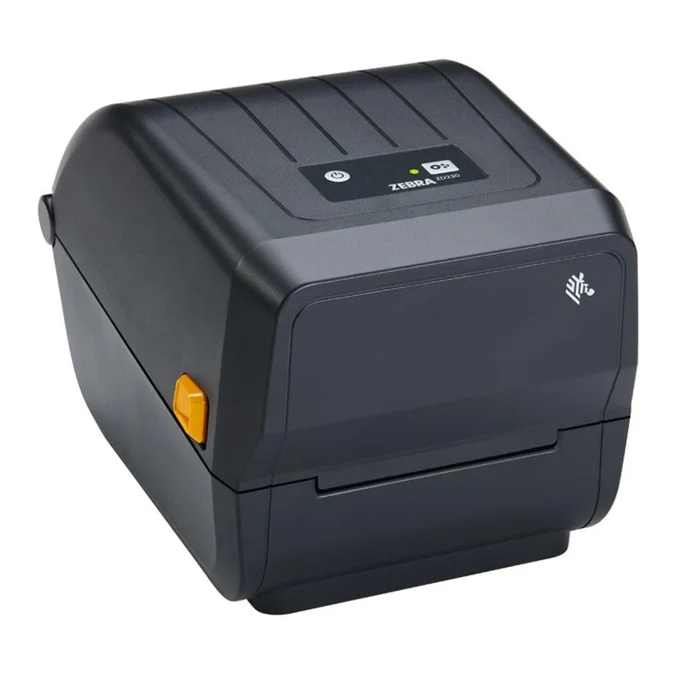
For small to medium-sized businesses managing logistics, warehousing, retail, or healthcare operations, high-efficiency barcode and label printing is non-negotiable. The Zebra ZD230 Thermal Transfer Desktop Printer delivers enterprise-level durability and crisp, smudge-proof print quality without forcing you to pay for features your operations don’t need.

TBA
.
Available To Order
- Free Delivery: Available for all Gauteng orders.
- Nationwide Delivery: For all other provinces R120 excl vat.
- Local Pickup: Free collection available from our premises.
Processing Time: Orders are ready for collection or dispatch within 2 to 4 working days after payment reflects in our account.
Key Advantages of the Zebra ZD230 Thermal Transfer Printer for Business Operations
The Zebra ZD230 Thermal Transfer Printer is an entry-level, 4-inch desktop label printer designed to deliver durable, long-lasting prints at a budget-friendly price point.
Print Method: Thermal Transfer
Max Print Width: 104mm
Print Speed: 6ips
Interface Ports: USB + Ethernet
Warranty: 2 Years
Product Brand: Zebra
MPN: ZD23042-30EC00EZ
Included Software: ZebraDesigner Essentials – easy label design tool
Ribbon Length: 74/300 meters
1. Zebra ZD230 Long-Lasting, Professional Print Durability
Unlike direct thermal printers that rely on heat-sensitive paper prone to fading over time, thermal transfer technology melts a carbon ribbon directly onto media. The Zebra ZD230 produces high-contrast, smudge-resistant barcodes, text, and shipping labels built to survive harsh environmental conditions, cold storage, and extended transit.
2. Zebra ZD230Low Total Cost of Ownership (TCO)
Budget printers often compromise on build quality, leading to frequent maintenance or early replacement. Zebra engineered the ZD230 with a dual-wall frame construction for added physical durability and qualified it under ENERGY STAR® standards to keep energy consumption low.
Furthermore, it accommodates a standard 300-meter ribbon roll. Larger ribbon capacity translates to fewer media changes during peak workflows, reducing worker downtime and lowering operational expenses over time.
3. Fast Print Speeds and Efficiency
In inventory and dispatch environments, speed directly impacts throughput:
- Print Speeds Up to 6 Inches/Sec (152 mm/s): Rapid throughput prevents bottlenecks at checkout lines or packing tables.
- 203 DPI Resolution: Delivers crisp 8 dots/mm barcode clarity for reliable 1D and 2D barcode scanning.
- Increased Onboard Memory: Supports expanded font storage and graphics loading for fast initial output times.
4. Zebra ZD230 Seamless Integration and Connectivity
Setting up hardware shouldn’t disrupt your existing IT infrastructure. The ZD230 supports multiple command languages—including ZPL® and EPL®—making it simple to replace legacy barcode printers without reprogramming your warehouse management or POS software.
| Feature | Advantage |
| Connectivity Options | Standard USB 2.0 with optional Factory-Installed Ethernet, Wi-Fi, or Bluetooth® |
| OpenACCESS™ Clamshell | Enables quick, intuitive ribbon and label roll replacements |
| Print DNA™ Basic | Core software suite powered by Zebra for easy setup, security updates, and central management |
| Optional Hardware | Available factory-installed peeler or cutter modules to customize workflow needs |
5. User-Friendly Design Out of the Box
The ZD230 keeps operation simple for everyday users. Its interface features a single LED indicator light and a single feed/pause button. Staff can assess device status (ready, paper out, error) at a quick glance without extensive technical training.
Zebra ZD230 Ideal Use Cases
- Transportation & Logistics: Waybills, packing slips, and tracking tags.
- Retail & E-commerce: Shelf-edge pricing, promotional tags, and order dispatch labels.
- Healthcare & Pharmacy: Sample collection tubes, specimen tracking, and prescription labels.
- Light Manufacturing: Asset tagging, compliance labeling, and product inventory tags.
By combining trusted construction, essential features, and straightforward software integration, the Zebra ZD230 thermal transfer printer provides a reliable foundation for any business requiring dependable, high-quality labeling.
Zebra ZD230 Thermal Transfer Printer Specifications
| Category | Specification | Details |
| Print Specifications | Print Method | Thermal Transfer (requires ribbon) & Direct Thermal |
| Resolution | 203 dpi / 8 dots per mm | |
| Max Print Speed | Up to 6 in. / 152 mm per second (programmable to 4 in./s) | |
| Max Print Width | 4.09 in. / 104 mm | |
| Max Print Length | 39.0 in. / 991 mm | |
| Media Characteristics | Media Width | 1.00 in. / 25.4 mm to 4.40 in. / 112 mm |
| Media Roll Size | 5.00 in. / 127 mm Outer Diameter | |
| Core Inner Diameter | 0.5 in. (12.7 mm) and 1.0 in. (25.4 mm) standard; optional 1.5 in. (38.1 mm) adapter | |
| Media Thickness | 0.003 in. (0.08 mm) min. to 0.0075 in. (0.1905 mm) max. | |
| Media Types | Roll-fed or fan-fold, die-cut or continuous label stock, tag stock, continuous receipt paper, wristbands | |
| Sensors | Full-width reflective / movable black mark sensor, fixed off-center transmissive gap sensor | |
| Ribbon Characteristics | Ribbon Length Capacity | Up to 984 ft. / 300 m (or 244 ft. / 74 m) |
| Ribbon Ratio | 1:4 media-to-ribbon ratio (300 m); 1:1 media-to-ribbon (74 m) | |
| Ribbon Width | 1.33 in. / 33.8 mm to 4.3 in. / 109.2 mm | |
| Ribbon Core I.D. | 300 m ribbon: 1.0 in. / 25.4 mm; 74 m ribbon: 0.5 in. / 12.7 mm | |
| Memory & Processing | Memory | 128 MB Flash / 128 MB SDRAM (or 256 MB Flash depending on build variant) |
| Firmware / Emulations | ZPL II®, EPL2™, XML | |
| Operating System Suite | Link-OS® Basic / Print DNA™ Basic | |
| Connectivity & Hardware | Standard Interfaces | USB 2.0 |
| Optional Factory Interfaces | Factory-installed Ethernet (10/100), Wi-Fi (802.11ac), or Bluetooth 4.1 | |
| User Interface | Single LED status indicator, single Feed/Pause button | |
| Optional Handling | Factory-installed Peeler (dispenser) or Cutter | |
| Physical Properties | Dimensions (L x W x H) | 10.5 in. x 7.75 in. x 7.5 in. / 267 mm x 197 mm x 191 mm |
| Weight | 2.5 lbs. / 1.1 kg | |
| Frame Construction | Dual-wall frame with OpenACCESS™ clamshell design | |
| Operating & Electrical | Operating Temperature | 40°F to 105°F / 4.4°C to 41°C |
| Electrical Specs | Auto-detectable 100–240 VAC, 50–60 Hz; ENERGY STAR® qualified | |
| Symbologies Supported | 1D Barcodes | Code 11, Code 39, Code 93, Code 128, ISBT-128, UPC-A, UPC-E, EAN-8, EAN-13, Interleaved 2-of-5, Codabar, Planet Code, Postnet, MSI, Plessey |
| 2D Barcodes | PDF417, MicroPDF417, Data Matrix, QR Code, Aztec, MaxiCode, Codablock, Code 49 |
