
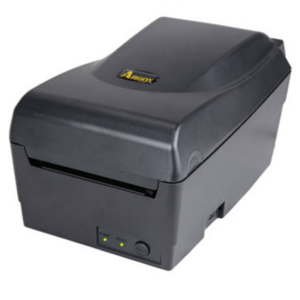
Enter the Argox OS-214EX PRO. Building on the legacy of Argox’s flagship OS series—trusted by over two million users worldwide—the OS-214EX PRO delivers speed, flexible connectivity, and smart space-saving engineering in an entry-level package.
R4,313.65 incl vat
Includes 2 Free Wax Ribbons
Available To Order
Free Delivery: Available for all Gauteng orders.
Nationwide Delivery: For all other provinces R120 excl vat.
Local Pickup: Free collection available from our premises.
Processing Time: Orders are ready for collection or dispatch within 2 to 4 working days after payment reflects in our account.
Master Small-Space Barcode Printing with the Argox OS-214EX PRO Desktop Label Printer
Efficiency in retail, healthcare, logistics, and light manufacturing depends on fast, accurate labeling. When counter or workbench space is at a premium, finding a high-performance desktop barcode printer can be a challenge.
Print Method: Thermal Transfer
Max Print Width: 108mm
Print Speed: 6ips
Memory: 128MB SDRAM, 128MB Flash ROM
Interface Ports: USB + Serial + Ethernet
Warranty: Printer 2 Years, Print Head 20km or 6 Months
Product Brand: Argox
MPN: ARG 99-21402-115
Included Software: Bartender UL, Argobar Pro, iLabelPrint+ and Drivers
Ribbon Length: 91 meters
Argox OS214EX PRO Key Product Highlights
1. Space-Saving “Shell Suit” Design
The OS-214EX PRO features a specialized Shell Suit chassis with a recessed rear interface roof. This design allows the unit to sit flat against a wall, saving valuable desk space while protecting rear cabling and ports from accidental liquid spills.
2. Fast Printing & Enhanced Memory
Powered by a 32-bit RISC processor alongside 128MB SDRAM and 128MB Flash ROM, the OS-214EX PRO processes complex graphics, 2D barcodes (such as QR codes and DataMatrix), and large print jobs smoothly at speeds up to 6 inches per second.
3. Argox OS-214EX PRO Effortless Media Loading
Down-time during roll replacements is minimized:
- 110° Opening Angle: The clamshell print module opens extra wide for easy ribbon and media changes.
- Universal Media Hanger: Includes a versatile core hanger supporting 0.5″, 1″, and 1.5″ media rolls without requiring extra adapters.
- Dual Printing Modes: Print short-term direct thermal labels or long-lasting thermal transfer labels using wax, resin, or wax/resin ribbons.
4. Comprehensive Out-of-the-Box Connectivity
Unlike entry-level printers that charge extra for networking, the OS-214EX PRO comes standard with USB Device, USB Host, Serial (RS-232), and Ethernet interfaces. Standard support for PPLA, PPLB, and PPLZ printer languages ensures simple integration into existing setups.
Argox OS-214EX PRO Primary Applications
- Retail & Point of Sale: Price tags, shelf edge labels, markdown labels, and barcode asset tags.
- Healthcare & Pharmacy: Patient wristbands, specimen labels, prescription tracking, and laboratory sample identification.
- Logistics & Warehousing: Shipping labels, inventory tags, compliance labels, and box identification.
- Asset & Facility Management: Equipment identification labels, file tracking, and durable asset tagging.
Argox OS-214EX PRO Driver & Software Compatibility
The Argox OS-214EX PRO supports Windows (Vista through Win 10/11), macOS, Linux, and Raspberry Pi drivers. It comes bundled with BarTender UltraLite and ArgoBar PRO software, enabling quick label formatting and direct database linking via ODBC (Excel, CSV, MS Access, SQL).
Argox OS-214EX PRO Printing Performance
- Print Method: Direct Thermal & Thermal Transfer
- Print Resolution: 203 dpi (8 dots/mm)
- Print Speed: Max. 6 ips (152.4 mm/s)
- Max. Print Width: 4.25 inches (108 mm)
- Max. Print Length: 100 inches (2540 mm)
System Architecture
- Processor: 32-bit RISC Microprocessor
- Memory: 128MB SDRAM, 128MB Flash ROM
- Interfaces: USB 2.0 Device, USB Host, RS-232 Serial, Ethernet (10/100 Mbps)
- Printer Emulations: PPLA, PPLB, PPLZ (Auto-sensing)
- User Interface: 2 x LED Indicators, 1 x Feed Button
- Sensors: Reflective Sensor x 1
Media & Ribbon Capacities
- Media Types: Roll-feed, die-cut, continuous, fan-fold, black mark, tags, and tickets (thermal or plain paper)
- Media Width: 0.8 in (20 mm) to 4.3 in (110 mm)
- Media Roll Outer Diameter (OD): Max. 5 in (127 mm)
- Media Core Size: 0.5 in (12.7 mm), 1.0 in (25.4 mm), or 1.5 in (38.1 mm)
- Ribbon Length: Max. 92 m (approx. 300 ft)
- Ribbon Width: 1 in (25.4 mm) to 4 in (102 mm)
- Ribbon Core Size: 0.5 in (12.7 mm) ID with notch
- Ribbon Formulations: Wax, Wax/Resin, Resin (Ink-side in or ink-side out)
Physical & Environmental
- Dimensions: 182.5 mm (W) x 173.5 mm (H) x 282 mm (D)
- Weight: 1.54 kg
- Design Feature: Shell Suit chassis with recessed interface roof for spill protection and flush-to-wall placement
Barcodes, Symbologies & Fonts
- 1D Barcodes: Code 39, Code 93, Code 128, GS1-128, UPC-A/E, EAN-8/13, Codabar, Interleaved 2 of 5, Industrial 2 of 5, MSI, Postnet, GS1 DataBar variants
- 2D Barcodes: QR Code, PDF417, MicroPDF, DataMatrix, GS1 DataMatrix, MaxiCode, Aztec
- Fonts: 5 internal alpha-numeric fonts; supports Windows TrueType scalable fonts and downloadable soft fonts
Software & Drivers
- Drivers: Windows (Win 7/8/10/11), macOS, Linux, Raspberry Pi
- Software Bundles: BarTender UltraLite, ArgoBar PRO (ODBC database linking via Excel, CSV, SQL), Printer Tool, iLabelPrint+
Q: What printing technologies does the Argox OS-214EX PRO support?
A: It supports both Direct Thermal (DT) printing (printing directly on heat-sensitive paper without a ribbon) and Thermal Transfer (TT) printing (using a ribbon on standard paper, semi-gloss, or synthetic media for durable labels).
Q: What are the main key specifications of the OS-214EX PRO?
- Print Resolution: 203 dpi (8 dots/mm)
- Print Speed: Up to 4 to 6 inches per second (IPS)
- Max Print Width: 4.25 inches (108 mm)
- Interfaces / Connectivity: USB, Serial (RS-232), and Built-in Ethernet
- Emulations Supported: PPLA, PPLB, and PPLZ (automatically auto-detecting language commands)
2. Media & Ribbon Loading
Q: What size ribbon does the printer use?
A:
- Core Size: 0.5-inch (12.7 mm) inner diameter
- Max Ribbon Length: Up to 90m / 92m
- Ribbon Structure: Ink-side OUT (Wax, Wax/Resin, or Resin depending on media)
Q: What media (label) sizes are compatible?
- Label Roll Core Size: 0.5-inch to 1.5-inch cores (using the included hanger clips)
- Max Roll Outer Diameter (OD): Up to 4.3 inches (109 mm)
- Label Width Range: 1 inch (25.4 mm) up to 4.33 inches (110 mm)
3. Operations & Calibration
Q: How do I calibrate the paper / gap sensor on the OS-214EX PRO?
A:
- Turn off the printer using the back power switch.
- Press and hold the FEED button on top.
- Turn the power switch ON while holding the FEED button.
- Release the FEED button when the printer starts feeding labels and the LEDs flash.
- The printer will measure the gap/black mark, advance a few labels, and print out a Self-Test configuration sheet.
Q: How do I perform a Factory Reset on the printer?
A:
- Turn off the printer.
- Press and hold the FEED button.
- Power on the printer and continue holding the FEED button for approximately 10 seconds until the READY LED turns off.
- Release the button; settings will revert to factory defaults.
4. Troubleshooting & LED Error Codes
Q: Both POWER and READY LEDs are flashing together. What does this mean?
A: This indicates a Label / Media Error. Common causes include:
- Out of Labels: Load a new roll of media.
- Gap Not Detected: Ensure the label guide is positioned over the label gap or black mark, then run a sensor calibration.
- Dirty Sensor: Clean the reflective/transmissive optical gap sensor using a soft brush or compressed air.
- Driver Mismatch: Ensure your print driver media setting (Die-Cut / Gap vs. Continuous) matches your actual label roll.
Q: The POWER and READY LEDs are flashing alternately. What does this mean?
A: This indicates a Ribbon Error.
- Ribbon Out / Jam: Check if the ribbon has run out or stuck.
- Core Not Spinning: Verify the ribbon supply and take-up cores are firmly engaged on the spindles.
- Driver Configuration: If printing Direct Thermal without a ribbon, ensure the driver software is set to “Direct Thermal” instead of “Thermal Transfer”.
Q: Why is my barcode printing faint, fuzzy, or skipping lines?
A:
- Dirty Thermal Printhead (TPH): Wipe the printhead heating elements gently with an alcohol swab or lint-free cloth dipped in 99% Isopropyl alcohol.
- Temperature/Heat Setting: Increase the printing darkness/density in your software or Windows driver settings.
- Ribbon Mismatch: Ensure you are using Wax ribbon for standard paper labels, or Wax/Resin / Resin for synthetic/polypropylene labels.
5. Software & Drivers
Q: Which software can I use to design and print labels?
A: The printer is fully supported by BarTender UltraLite / BarTender Software (by Seagull Scientific) as well as Argox’s Printer Tool utility for hardware configuration and network IP setup.
Q: How do I configure the Ethernet IP address?
A: Use the Argox Printer Tool setup utility over a USB connection. Under the Network Configuration tab, assign either a Static IP address or enable DHCP to integrate the printer into your local network.

