
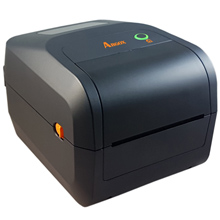
The Argox O4-250 PRO is a versatile 4-inch desktop barcode label printer designed for small-to-medium-sized businesses that need fast, reliable, and cost-effective printing. Handling both Direct Thermal (DT) and Thermal Transfer (TT) printing, it strikes a balance between enterprise-level connectivity and user-friendly desktop operations.

R5,332.55 incl vat
Includes 2 free wax ribbons
Available To Order
- Free Delivery: Available for all Gauteng orders.
- Nationwide Delivery: For all other provinces R120 excl vat.
- Local Pickup: Free collection available from our premises.
Processing Time: Orders are ready for collection or dispatch within 2 to 4 working days after payment reflects in our account.
Outstanding Advantages of the Argox O4-250 PRO
The O4-250 PRO automatically detects and translates the major printer command languages, including PPLA, PPLB, and PPLZ. This plug-and-play capability allows seamless drop-in replacements for legacy setups without reconfiguring software or label templates
Print Method: Thermal Transfer and Direct Thermal
Max Print Width: 108mm
Memory: 128MB SDRAM, 128MB Flash ROM
Print Speed: 7ips
Interface Ports: USB + Serial + Ethernet
Warranty: 2 Years
Product Brand: Argox
MPN: ARG 99-O4202-003
Included Software: Bartender UL, Argobar Pro, iLabelPrint+ and Drivers
Ribbon Length: 91 meters
Outstanding Advantages of the Argox O4-250 PRO
1. Argox O4-250 PRO Fast, High-Contrast Printing
Operating at up to 7 ips (inches per second) with a 203 dpi resolution, the O4-250 PRO produces crisp 1D and 2D barcodes, clear text, and high-contrast logos without sacrificing throughput during high-volume shipping cycles.
2. Argox O4-250 PRO Clamshell Design for Easy Media Loading
Media changeovers are quick thanks to its top-loading clamshell mechanism. The wide interior bay allows operators to pop open the lid and rethread thermal paper rolls and ribbons in seconds, reducing line downtime in busy warehouse environments.
3. All-Inclusive Standard Connectivity
Unlike many entry-level desktop printers that lock networking behind paid upgrades, the O4-250 PRO includes standard Ethernet, RS-232 Serial, USB Device, and Dual USB Host ports. The dual USB host slots allow you to plug in external devices like barcode scanners or keyboards for standalone printing operations.
4. Smart Language Emulation
The O4-250 PRO automatically detects and translates the major printer command languages, including PPLA, PPLB, and PPLZ. This plug-and-play capability allows seamless drop-in replacements for legacy setups without reconfiguring software or label templates.
5. Argox O4-250 PRO Generous On-Board Memory
Equipped with 128 MB SDRAM and 128 MB Flash, the unit can store extensive font sets, complex label templates, and graphic assets directly on the printer, accelerating first-label-out speeds and freeing up host system bandwidth.
Best Applications
- Logistics & Warehousing: Shipping labels, pallet IDs, bin markers, waybills, and compliance tags.
- Retail & E-commerce: Price tags, shelf-edge labeling, itemized tracking, and return processing.
- Manufacturing: Work-in-process tracking, product identification tags, and carton packaging.
- Healthcare & Labs: Specimen tracking, asset tagging, and pharmacy labels.
Argox O4-250 PRO Print Specifications
- Print Method: Direct Thermal (DT) & Thermal Transfer (TT)
- Print Resolution: 203 dpi (8 dots/mm)
- Max. Print Speed: Up to 7 ips (177.8 mm/s)
- Max. Print Width: 4.25 inches (108 mm)
- Max. Print Length: Up to 100 inches (2,540 mm)
- Processor / Memory: 32-bit RISC Microprocessor | 128 MB SDRAM, 128 MB Flash ROM
Argox O4-250 PRO Media & Ribbon Specifications
- Media Type: Roll-feed, die-cut, continuous, fan-fold, black mark, tags, ticket in thermal paper or plain paper
- Media Width:
- Max: 4.65 inches (118 mm)
- Min: 0.8 inches (20 mm)
- Media Thickness: 0.0024″ to 0.008″ (0.06 mm to 0.2 mm)
- Media Roll Capacity (OD):
- 5″ (127 mm) OD on a 1″ / 1.5″ (25.4 / 38 mm) ID core
- 4.5″ (115 mm) OD on a 0.5″ (12.7 mm) ID core
- Optional: External media stand supports up to 8″ OD on 1″ / 3″ ID core
- Ribbon Specifications:
- Width: 1″ to 4.33″ (25.4 mm to 110 mm)
- Length: Max 110 m
- Core Size: 0.5″ (12.7 mm) ID with notch
- Types: Wax, Wax/Resin, Resin (Auto-detects ink-side in or ink-side out)
- Sensors: 1x Movable Reflective Sensor, 1x Fixed Transmissive Sensor (6.27 mm offset), Head Open Switch, Ribbon End Sensor
Fonts, Graphics & Barcodes
- Emulations / Command Languages: Auto-detection for PPLA, PPLB, and PPLZ
- Fonts: 5 internal alpha-numeric character sets, downloadable soft fonts, supports standard Windows TrueType scalable fonts
- Graphics Formats:
- PPLA: PCX, BMP, IMG, HEX, GDI
- PPLB: PCX, BMP, Binary Raster, GDI
- PPLZ: GRF, Hex, GDI
- 1D Barcodes: Code 39, Code 93, Code 128, GS1-128, Codabar, Interleaved 2 of 5, Industrial 2 of 5, UPC-A, UPC-E, EAN-8, EAN-13, MSI, POSTNET, GS1 DataBar variants
- 2D Barcodes: QR Code, PDF417 (including MicroPDF), DataMatrix (ECC200), GS1 DataMatrix, MaxiCode
Interfaces, Software & Operation
- Standard Connectivity:
- Ethernet (10/100 Mbps)
- USB Device
- Dual USB Host ports (for standalone devices like scanners/keyboards)
- RS-232 Serial
- Optional Wireless (Dealer Add-ons): Wi-Fi (802.11 b/g/n) and Bluetooth 4.2
- User Interface: 1x Feed Button, Dual LED Indicators (3-color status LED)
- Included Software & Drivers: BarTender® UltraLite, Argobar Pro, Printer Tool utility, Windows Drivers (Win 7 through Win 11), Linux Drivers, macOS Drivers
Physical & Electrical Characteristics
- Dimensions: 209 mm (W) x 179.2 mm (H) x 266 mm (D)
- Weight: 2.2 kg (4.8 lbs)
- Power Supply: Universal Switching Power Supply
- Input: AC 100~240V, 50~60 Hz
- Output: DC 24V, 2.4A
- Operating Temperature: 5°C to 40°C (41°F to 104°F); 25% to 85% non-condensing humidity
- Storage Temperature: -20°C to 60°C (-4°F to 140°F); 10% to 90% non-condensing humidity
- Agency Approvals: CE, FCC, CB, cTUVus, Energy Star, RoHS, BSMI, RCM
Optional Accessories & Hardware Modules
- Guillotine-type Full/Partial Label Cutter
- Label Peeler Module
- External 8-inch OD Media Roll Stand
- Real-Time Clock (RTC)
1. General & Technical Overview
Q: What printing methods does the Argox O4-250 PRO support?
A: It supports both Direct Thermal (DT) (heat-sensitive paper without a ribbon) and Thermal Transfer (TT) (using a ribbon with paper, semi-gloss, or synthetic media).
Q: What are the key performance specifications?
- Print Resolution: 203 dpi (8 dots/mm)
- Print Speed: Up to 7 inches per second (ips)
- Max Print Width: 4.25 inches (108 mm)
- Standard Interfaces: USB Device, USB Host (Dual), RS-232 Serial, and Ethernet (LAN)
- Wireless Options: Factory/dealer add-ons for Wi-Fi (802.11 b/g/n) and Bluetooth 4.2
- Command Languages: Automatic emulation auto-detection for PPLA, PPLB, and PPLZ
- Memory: 128 MB SDRAM and 128 MB Flash ROM
Q: What can the Dual USB Host ports be used for?
A: The USB Host interface lets you attach peripheral devices such as a USB barcode scanner or numeric keypad to operate the printer in standalone mode without a connected PC.
2. Media & Ribbon Handling
Q: What ribbon specifications are compatible with the O4-250 PRO?
- Ribbon Length: Supports up to 110 meters or standard 300-meter rolls (when using external adapters/spindles depending on configuration).
- Core Sizes: 0.5-inch (12.7 mm) or 1-inch (25.4 mm) inner diameter.
- Ribbon Winding: Accepts both Ink-Side IN and Ink-Side OUT ribbon rolls (auto-detected).
Q: What media (label) dimensions does it accept?
- Label Width: 0.8 inches (20 mm) up to 4.65 inches (118 mm).
- Label Roll Outer Diameter (OD): Up to 5 inches (127 mm) OD on a 1-inch or 1.5-inch core.
- External Roll Option: An optional external media stand supports larger 8-inch OD rolls on 1-inch or 3-inch cores.
3. Calibration & Reset Procedures
Q: How do I calibrate the gap/black mark sensor on the O4-250 PRO?
A:
- Turn off the printer via the rear power switch.
- Press and hold the FEED button on the top cover.
- Turn the power switch ON while continuing to hold the FEED button.
- Release the button when the printer feeds labels and the status LEDs start flashing.
- The printer will measure the gap or reflective black mark, align the media, and print out a configuration/Self-Test sheet.
Q: How do I perform a Factory Reset?
A:
- Turn off the printer.
- Press and hold the FEED button.
- Power the unit ON and hold the FEED button for approximately 10 seconds until the status LEDs change color or turn off.
- Release the FEED button. Memory settings, IP parameters, and sensor calibrations will revert to factory defaults.
4. LED Error Status & Troubleshooting
Q: What does it mean when the STATUS / READY light blinks RED?
A: This indicates a Media or Sensor Error. Common fixes:
- Out of Media: Reload a fresh roll of labels.
- Sensor Out of Position: Check that the movable reflective/transmissive sensor is positioned directly underneath the label gap or black mark.
- Dirty Sensor: Dust and adhesive buildup can block the optical eye. Clean it with dry compressed air or a soft brush.
- Driver Mismatch: Ensure the print job settings (Gap, Black Mark, Continuous) match the installed label type.
Q: Why is the printer skipping labels or feeding blank labels continuously?
A: The printer has lost its label length memory. Run a Media Calibration (holding FEED while powering on) to force the optical sensor to measure the backing paper and label boundaries.
Q: Why are prints faint, blurry, or missing lines?
A:
- Dirty Thermal Printhead: Clean the heating elements on the printhead using a swab dipped in 99% Isopropyl Alcohol.
- Low Print Darkness: Increase the darkness/heat setting in your Windows Printer Properties or label software.
- Incorrect Ribbon Type: Ensure you match Wax ribbons with plain paper labels, and Wax/Resin or Resin ribbons with synthetic/glossy substrates.
5. Software & Connectivity Setup
Q: Which drivers and design software are compatible?
A: The O4-250 PRO is supported by Seagull Scientific Drivers for Windows (7 through 11, Server), Linux CUPS drivers, and macOS drivers. It includes BarTender UltraLite and Argobar Pro for design and printing.
Q: How do I set a Static IP address for Ethernet printing?
A: Connect the printer via USB and open the Argox Printer Tool utility. Under network/Ethernet settings, toggle off DHCP, type in your designated Static IP address, Subnet Mask, and Gateway, then click Set to save.

